Best AI t-shirt design generators in 2026, for a real shirt or a file
By Shirrts · October 21, 2026
On this page▾
- Short answer
- Comparison table
- If you want a printed shirt
- Same idea, three printers
- 1. Shirrts: best for a great-looking shirt without writing a prompt
- 2. RushOrderTees /ai: a big printer's free add-on tool
- 3. gptshirt: a simple AI-only shop, one design at a time
- 4. Sizzlepop: best cheap way to get both a file and a print
- If you want a design file
- 5. Kittl: best for lettering and editing a design into shape
- 6. Canva: best if you already use Canva
- 7. Krea: best raw image quality for designers who want options
- 8. Adobe Express: a solid all-rounder with printing built in
- What to check in any AI shirt tool
- Frequently asked questions
People searching "AI t-shirt design" want one of two things. Some want a shirt in their hands, for a birthday, a reunion, a team. Others want a file: a PNG or SVG they can edit, sell on Merch by Amazon, or send to their own printer. The best tool for one job is usually a poor pick for the other, so this guide splits the verdicts, starting with printed shirts.
We make one of these tools (Shirrts), so read our entry with that in mind. We tried to be fair to the others. Where Canva or Kittl does a job better than we do, we say so.
Short answer
If you want a printed shirt, use Shirrts. You fill out a short form instead of writing a prompt, get four print-ready designs at a time, edit them by describing the change, and a real person helps for free if you need it.
If you want a file to edit or sell, use Kittl when lettering and layout matter, Canva if you already live in Canva, and Krea if you want the strongest image models in one place.
If you want a file and maybe a print, on a small budget, Sizzlepop is free to try and charges $9 for a clean file.
Comparison table
| Tool | Free tier | Paid price | You get | Prints shirts? | Commercial use |
|---|---|---|---|---|---|
| Shirrts | First rounds free, no account needed | Tees $26.99 | Printed shirt | Yes, DTG, no minimum | Original designs are yours to print |
| RushOrderTees /ai | Free, no signup | Price shown after you save with an email | Printed shirt | Yes, no minimum | Not stated |
| gptshirt | 10 credits; each design or change uses one | White tee $20.25 | Printed shirt | Yes, DTG in the USA | Not stated |
| Sizzlepop | Free, watermarked 512px drafts | $9 per clean file | File or printed product | Yes, free US shipping | You own what you generate |
| Kittl | Yes, small token allowance | Pro about $15/mo (less yearly) | Editable file, vector export on paid plans | No | Paid plans only, up to 500,000 copies per design |
| Canva | Yes, with a monthly AI allowance | Pro about $18/mo or $144/yr | Editable design file | Yes, Canva Print (about $23.50 for one tee) | Allowed for merch under its AI terms, no exclusivity |
| Krea | 100 compute units a day | From $9/mo ($5 yearly) | Image file | No | Included on paid plans |
| Adobe Express | Yes, limited daily AI | Premium $9.99/mo | Editable design file | Yes, through Zazzle (US, UK, CA, AU) | Firefly is sold as commercially safe |
Prices are as of October 2026. These tools change plans often, so check the pricing page before you pay.
If you want a printed shirt
These four are printers first. You describe what you want, approve a design, and a shirt shows up. The big differences are how much the AI asks of you and how well its designs are made for printing.
Same idea, three printers
We gave Shirrts, RushOrderTees and gptshirt the same idea on October 21, 2026: a retro sunset shirt for the "Johnson Family Reunion 2026" at Lake Tahoe. These are the results each one showed, with no reruns to get better ones.
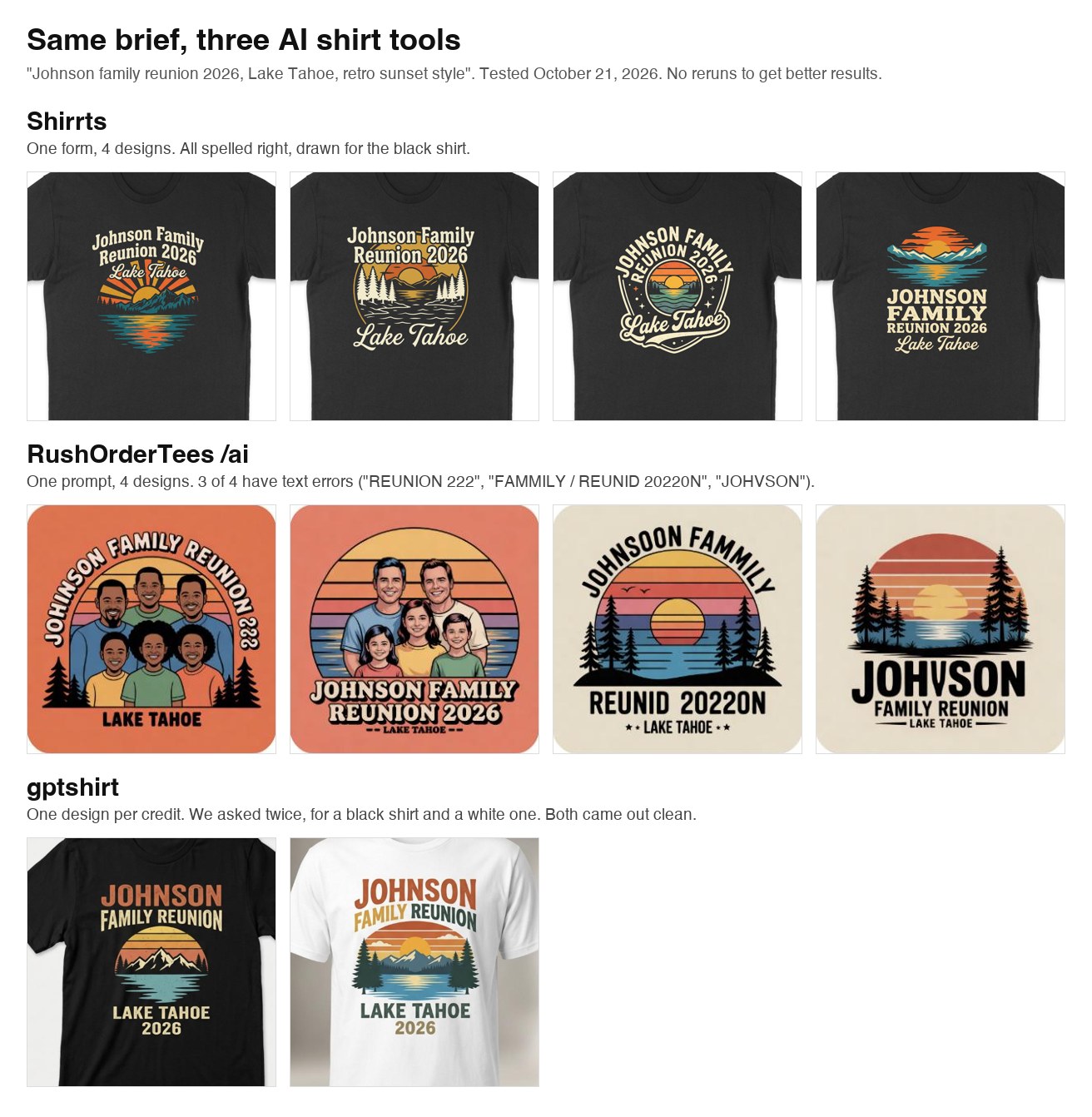
Shirrts took a short form and gave us four designs, each with a different layout, and every one spelled the names right.
RushOrderTees took our own prompt and gave us four designs that were mostly variations on two ideas. Three of the four had spelling mistakes.
gptshirt took our own prompt and gave us one design per credit. Both of ours were clean, and they were close to each other in layout.
1. Shirrts: best for a great-looking shirt without writing a prompt
Shirrts was built from scratch around AI design and printing, so there's no prompt to write and no canvas editor to learn. You fill out the shirt generator form: what the shirt is for, the words you want, a style and mood, a color palette and the shirt color. You can add a logo or photo too. The form turns that into four designs at a time.
In our reunion test, the form returned four designs in under 30 seconds, all spelled right and drawn for the black shirt we picked. That's on purpose. The AI is tuned to work like a shirt designer: a tight color palette, artwork drawn for your shirt color, text that stays readable on it, and ink only where the art is, so the shirt shows through instead of a printed box around the design. Every design is upscaled before it prints, so it doesn't come out soft.
Changing a design is easy. Open it, describe the edit ("make the mountains bigger", "change the year to 2027"), and the new versions land next to the old ones so you can compare. Switching the garment or shirt color keeps the artwork as it is. Run the form again for a fresh batch and you'll soon have dozens of options. Save your favorites and send your group a link so they can vote.
If the AI still isn't getting it, a real person will help with your design for free, and a person checks every order before it prints. Shirrts prints on tees, long sleeves, crewneck sweatshirts and hoodies, in sizes from baby onesie to 4XL, with no minimum and bulk discounts from 10 shirts. It's rated 4.8 on Trustpilot from 262 reviews, 90% of them 5 stars. One customer, Kelly M., wrote that "using their AI tool was magical" and the shirts "look and feel amazing." Another, John B., liked that it uses AI "to design what is in your head."
Shirrts prints shirts. It doesn't sell design files, so if you need a PNG for Merch by Amazon, use one of the design-file tools below.
2. RushOrderTees /ai: a big printer's free add-on tool
RushOrderTees is a large printer with a free AI tool on top. You pick a category, write your own description, and get four designs. No signup.
We ran the reunion test through it twice. The first attempt returned an error. Across the two runs that worked, five of the eight designs had misspelled or garbled text, including "JONNSON," "REUNID 20220N" and "JOHVSON." The ones it spelled right were solid designs.
The AI sits on top of RushOrderTees' regular design studio. After you pick one of the four designs, you're in their canvas editor, with its product catalog to choose from and tools for text, uploads and clip art. To change the art, you select it, click "Edit with AI" and describe the change, and it shows one new version next to the original. New batches come from the separate AI page, so trying lots of ideas means going back and forth between the two. You also have to save your design with an email address before it shows you a price.
Shipping is free and there's no minimum.
3. gptshirt: a simple AI-only shop, one design at a time
gptshirt is a small AI shirt shop. You type a description (or upload an image), it puts one design on a shirt preview, and you can ask for changes in a chat box. It prints with DTG on Bella+Canvas tees, hoodies, sweatshirts and onesies in the USA, with no minimum. A white tee in size M was $20.25 when we checked.
Each request gives you one design, and each new design or change uses a credit. New visitors start with 10 credits; after that, credit packs start at 40 for $5.99. Because it's one design at a time from your own wording, getting a good result depends on how well you write the description. Both designs it gave us for the reunion test were clean.
It has 10 reviews on Trustpilot (4.2). In one of them, a customer says the AI "did not know what I meant" when they asked for fixes, and they had to email the team.
4. Sizzlepop: best cheap way to get both a file and a print
Sizzlepop lets you generate for free without signing up. Free drafts are watermarked 512px previews. A clean high-res file is $9, and you can use it anywhere, or order it printed on a tee, mug, poster or phone case with free US shipping (about 2 to 4 days to make, 5 to 8 to deliver). It says you own what you generate.
It's newer and smaller than the rest of this list, and 512px previews make it hard to judge fine detail before you pay for the file.
If you want a design file
These four make an image you can edit, export and take to any printer or marketplace. Two of them (Canva and Adobe Express) can also print for you.
5. Kittl: best for lettering and editing a design into shape
Kittl is built around typography. Curved text, vintage badges, text effects and real fonts are all a click away, and the AI image generator sits inside the same editor. If your shirt is mostly words, or you want to fix the AI's version by hand, Kittl is the best tool on this list.
Licensing is the trade-off. The free plan is personal use only, and AI images you make on it are shared with the Kittl community. To sell shirts you need a paid plan, which allows merch up to 500,000 printed copies per design (no cap on Max). Paid plans run about $15 a month, less billed yearly. Kittl doesn't print anything, so you'll still need a printer.
6. Canva: best if you already use Canva
Canva's t-shirt templates and AI image tools are easy, and the free plan gives you a monthly allowance of AI generations. It's the tool most people already know, which counts for a lot. Canva Print will also ship you a tee, about $23.50 for one with no minimum.
Canva's help pages say you can use its AI images on merch you sell, under its AI terms. They also say you may not get exclusive rights to those images. For text-heavy designs, Kittl's type tools are stronger. Pro is about $18 a month or $144 a year.
7. Krea: best raw image quality for designers who want options
Krea gives you dozens of image models in one place, including Ideogram, GPT Image, Nano Banana, Flux and Recraft. Ideogram and the GPT Image models are good at spelling words correctly, which matters a lot on a shirt. If you know what you're doing with prompts and want to try the same idea across five models, this is the tool.
It's a general image tool, so there's nothing shirt-specific. No templates, no mockups that match a real blank, no printing. The free plan gives 100 compute units a day. Paid plans start at $9 a month ($5 billed yearly) and include a commercial license.
8. Adobe Express: a solid all-rounder with printing built in
Adobe Express runs on Firefly, Adobe's image model, which Adobe trained to be safe for commercial use. That's a real plus if you plan to sell. It also has AI text effects and a large template library, and it can print and ship your design through Zazzle, but only in the US, UK, Canada and Australia.
Image models still slip on longer text, Firefly included, so check every word. The free plan has a small daily AI limit. Premium is $9.99 a month with 250 generative credits.
What to check in any AI shirt tool
Text first. AI still misspells words, and a typo on 30 printed shirts is a bad day. Read every letter before you order or export.
Then resolution. Most AI images come out around 1024 pixels wide. A chest print wants about three times that. Printers that run their own AI tool should handle this for you (ask if they don't say). With a file tool, export at the highest size you can or run it through an upscaler.
Ask for flat artwork on a plain background, no shirt mockup. Otherwise you can end up printing a box around your design.
On rights: original designs are fine to print and usually fine to sell, within each tool's terms. Logos and characters you don't own aren't, and AI doesn't change that.
If you made your design somewhere else, like ChatGPT or Gemini, our guide on printing a ChatGPT or Gemini design on a shirt covers the steps.
Frequently asked questions
- What is the best AI t-shirt design generator?
It depends on what you want at the end. For a printed shirt, Shirrts is the easiest: you fill out a short form instead of writing a prompt, get four print-ready designs at a time, edit them by describing the change, and get free help from a real person if you need it. For a design file to edit or sell, Kittl is best for text-heavy designs and Canva is easiest if you already use it.
- Is there a free AI t-shirt design generator?
Yes. RushOrderTees /ai and Sizzlepop are free to use without signing up, Shirrts lets you design your first rounds free with no account, gptshirt starts you with 10 credits, and Canva, Kittl, Krea and Adobe Express all have free plans with limited AI generations. Free plans often restrict commercial use, so check the terms if you plan to sell.
- Can I sell t-shirts made with an AI design generator?
Usually, if the design is original and you follow the tool's terms. Kittl allows merch sales only on paid plans, up to 500,000 copies per design. Krea includes a commercial license on paid plans. Canva allows AI images on merch under its AI terms but doesn't promise exclusive rights. No tool lets you print someone else's logo or character.
- Which AI is best at putting text on a t-shirt?
For editing text by hand, Kittl has the strongest typography tools. Among image models, Ideogram and OpenAI's GPT Image models spell words most reliably; Krea gives access to both. Whatever you use, check every letter before you print.
- Can I get an AI-designed shirt printed without a minimum order?
Yes. Shirrts, RushOrderTees, gptshirt, Sizzlepop and Canva Print all print a single shirt. Adobe Express can print through Zazzle in the US, UK, Canada and Australia. Kittl and Krea only make the file.
- How much does an AI-designed t-shirt cost?
As of October 2026: Shirrts is $26.99 for a tee ($33.98 front and back) with free shipping on two or more and bulk discounts from 10 shirts. gptshirt was $20.25 for a white tee and Canva Print about $23.50. RushOrderTees only shows a price after you save your design with an email.
- Do AI t-shirt designs print blurry?
They can. Most AI images are about 1024 pixels wide, roughly a third of what a full chest print needs, so they come out soft if printed as-is. Upscale the file first, or use a printer that upscales for you. Shirrts upscales every design before it prints.