How to print a ChatGPT or Gemini design on a real shirt
By Shirrts · August 21, 2026 · Updated September 4, 2026
On this page▾
You made a design in ChatGPT or Gemini. Now you want it on a real shirt. This guide shows you the whole path. It works the same for both apps, and for any other image tool.
TL;DR
- Save or screenshot your design. Both work.
- ChatGPT and Gemini images are small. They need AI upscaling before they print well.
- Original designs are yours to print. Logos and characters you don't own are not.
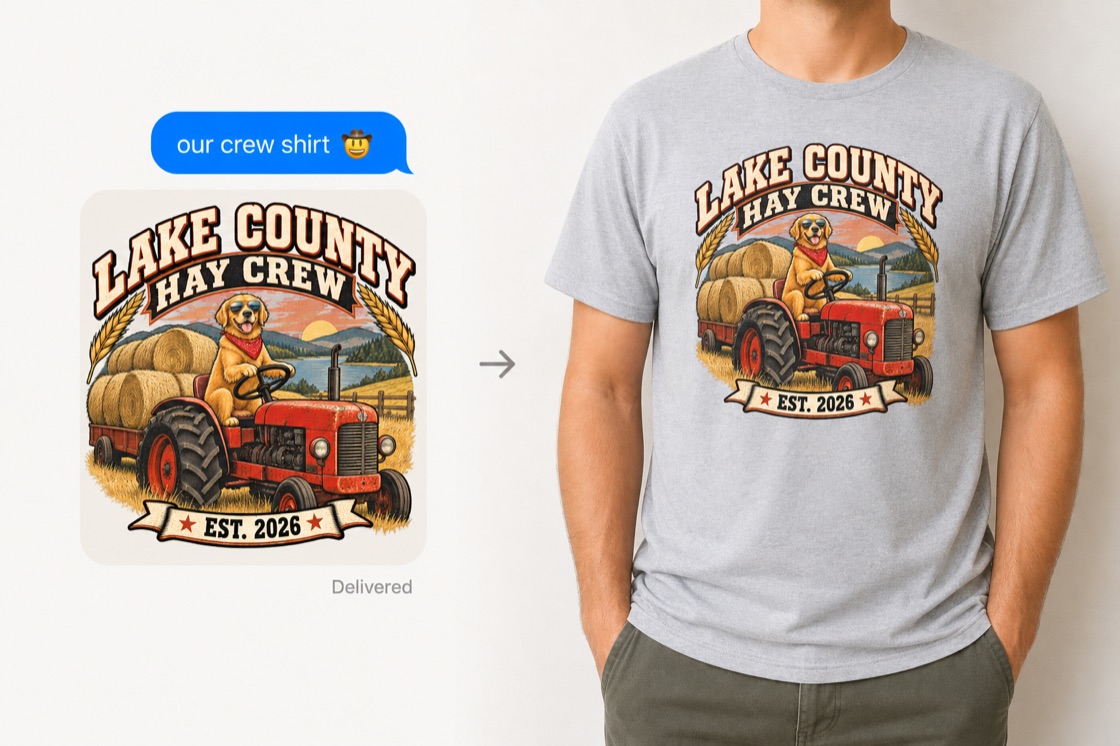
- Easiest path: text your design to Shirrts at (888) 849-7322. You get back a free preview of it on a real shirt in minutes. Shirts are $26.99.
Save the image out of the app
In ChatGPT or Gemini on your phone, tap the image in the chat. Then tap the download or share arrow. On a computer, hover over the image and click the download icon.
A screenshot works too. It's a slightly weaker copy than the download, but printers can work with it. If you text your design to Shirrts, a screenshot is completely fine.
One tip: save the design as soon as you like it. Old chats are a pain to dig through later.
Make the design print-worthy first
Shirrts generates thousands of shirt designs, and its design tool pushes every one toward three rules. Use the same rules in ChatGPT or Gemini and your design will look like it was made for a shirt, because it was.
1. Keep the colors tight. Good shirt designs use a handful of colors that work together. Too many colors looks cartoonish. Tell the app: "use a tight color palette, every color should serve the design."
2. Ask for a knockout-style design. On the best shirts, the ink goes only where the art is, and the shirt color shows through everywhere else. No printed box around the design. ChatGPT and Gemini both love putting your design on a background color you didn't ask for. So tell them: "flat design artwork on a plain solid background in [your shirt color], no shirt mockup." Two good things happen. The design reads as part of the shirt. And the text stays legible, because it was made against the real shirt color. (If your design already has a background, don't worry. Shirrts helps you decide in the preview whether to keep it or knock it out.)
3. Get the text and image working together. Give the app the exact words in quotes. Use one color for all the text. A second text color is fine for a tagline, and that's it. Don't let it invent extra words. And check the spelling every single time. "FAMILLY" on 30 printed shirts is a bad day.
Two more checks before you order, learned from real orders: make sure you got the design itself, not a photo of a shirt wearing it. And look at the corners for small stray text or marks you didn't ask for. AI images sometimes pick those up. (Shirrts checks for both before printing, but it saves a round trip.)
The resolution problem
Here's the part most people miss. ChatGPT and Gemini images are about 1024 pixels wide. That sounds like a lot. For printing, it isn't. A chest-size print needs about three times more. Print a raw AI image at full size and it comes out soft and blurry.
You have three ways out:
- Ask the app to remake the design "at the highest possible resolution." It helps a little. It won't get you all the way there.
- Run the image through a free AI upscaler before you send it to a printer.
- Use a printer that upscales for you. Shirrts runs every design through an AI upscaler before it prints.
If you use another printer, ask them one question: "What do you do with a 1024-pixel file?" If the answer is "we just print it," go somewhere else.
Can you legally print an AI design?
Yes, for almost everything people actually make.
OpenAI's rules say you own the images you create with ChatGPT. Google says it doesn't claim ownership of what Gemini makes for you. Either way, your family reunion design is yours. Your dog in sunglasses on a tractor is yours. You can print them. You can even sell them.
There's one line you can't cross. If the design contains someone else's logo or character (a sports team logo, a movie character), you can't print it. Making it with AI doesn't change that rule. Shirrts won't print those, and no good printer will. A real person looks at every order before it prints.
Original design? You're fine. That covers nearly everyone.
Your options for printing it
Iron-on transfer at home. Cheapest. Fine for a one-time costume shirt. The print cracks and peels after a few washes.
A local print shop. Good quality and real people. Most charge a setup fee and want a minimum order. Great when you need 50 shirts. Overkill for two.
An online printing service. This is what Shirrts does. The design is printed straight into the fabric, so it won't crack or peel. No setup fee. One shirt is a normal order.
The easy way: text it to Shirrts
Text your design to Shirrts at (888) 849-7322. It can come from ChatGPT, Gemini, Midjourney, or anywhere else. You get back a free preview of it on a real shirt, usually within minutes. Screenshots are fine. A real person fixes the resolution and placement. Nothing prints until you say yes.
The preview is free. No payment info, no signup. If you like it, you order right in the text thread. Start at shirrts.com/text.
Want to do it on a screen instead? You have two options. To print the image just as it is, upload it to logo to shirt. Shirrts removes the background, upscales it, and gets it shirt-ready. To use the image as part of a bigger design, with words added or things changed up, start in the Shirrts designer.
What it costs
A shirt with your design on it is $26.99. Double-sided is $33.98. Shipping is free on two or more shirts. Standard delivery takes 5 to 10 business days. Express shipping gets it there in 3 to 6.
Ordering for a group? Discounts start at 10 shirts (8% off). At 100 shirts you get 30% off, which is $18.89 each. The bulk pricing table has all the tiers.
Frequently asked questions
- What should I tell ChatGPT or Gemini to get a design that prints well on a shirt?
The same three things work in both apps. Ask for a tight color palette (too many colors looks cartoonish). Ask for flat design artwork on a plain solid background in your shirt color, with no shirt mockup, so the ink can go only where the art is. And give it the exact text in quotes, with one color for all the text. Then check the spelling before you order.
- Can you print designs from Gemini or other AI apps?
Yes. Gemini, Midjourney, and any other image tool work the same way. Text the image to (888) 849-7322. Gemini designs also come with a background color; in the free preview we help you keep it or knock it out, and we upscale the image before printing.
- Can I print any image ChatGPT or Gemini makes on a shirt?
Almost any. OpenAI's terms give you the rights to images you generate, and Google doesn't claim ownership of Gemini's output, so original designs are yours to print or even sell. The exception is designs containing someone else's trademark or character, like a team logo or a movie character. AI doesn't change those rights, and reputable printers, including Shirrts, won't print them.
- What resolution do ChatGPT and Gemini images have, and is it enough to print?
ChatGPT and Gemini images are typically around 1024 pixels per side, which works out to roughly 85 DPI at a 12-inch print size. Shirt printing wants about 300 DPI, so a raw AI image prints soft. The fix is AI upscaling before printing. Shirrts upscales every design automatically as part of the order.
- Is a screenshot of my design good enough to print from?
Yes. A downloaded image is slightly better, but a screenshot works fine, especially with upscaling in the pipeline. If you text your design to Shirrts at (888) 849-7322, screenshots and photos are explicitly fine.
- How much does it cost to print an AI design on a shirt?
At Shirrts, $26.99 for a single-sided shirt and $33.98 for double-sided, printed on ringspun cotton. Shipping is free on two or more shirts. Bulk discounts start at 10 shirts and reach 30% off at 100 or more.
- How long does it take to get the shirt?
Standard delivery is 5 to 10 business days. Express brings it to 3 to 6 business days when there's a deadline. The free preview of your design on a shirt arrives by text within minutes, before you pay anything.
- What's the easiest way to go from a ChatGPT or Gemini design to a real shirt?
Text the image to (888) 849-7322 or start at shirrts.com/text. You get a free preview of your design on a real shirt in minutes, a real person fixes resolution and placement, and nothing prints until you approve it.